


PWM Library
CCP module is available with a number of PIC MCUs. mikroC PRO for PIC provides library which simplifies using PWM HW Module.
 Important :
- Some MCUs have multiple CCP modules. In order to use the desired CCP library routine, simply change the
xin the prototype with the appropriate module number, i.e.PWM2_Start();.
Library Routines
PWMx_Init
| Prototype |
void PWMx_Init(long freq); // For Enhanced Mid-Range Core 145x/150x MCUsvoid PWMx_Init(unsigned long PWM_Freq, unsigned int timer_prescaler); |
|---|---|
| Returns |
Nothing. |
| Description |
Initializes the PWM module with duty ratio 0. Parameter This routine needs to be called before using other functions from PWM Library. |
| Requires |
MCU must have CCP module. Note :
Calculation of the PWM frequency value is carried out by the compiler, as it would produce a relatively large code if performed on the library level. Therefore, compiler needs to know the value of the parameter in the compile time. That is why this parameter needs to be a constant, and not a variable. |
| Example |
Initialize PWM module at 5KHz: PWM1_Init(5000); |
PWMx_Set_Duty
| Prototype |
void PWMx_Set_Duty(unsigned short duty_ratio); |
|---|---|
| Returns |
Nothing. |
| Description |
Sets PWM duty ratio. Parameter |
| Requires |
MCU must have CCP module. PWMx_Init must be called before using this routine. |
| Example |
Set duty ratio to 75%: PWM1_Set_Duty(192); |
PWMx_Start
| Prototype |
void PWMx_Start(void); |
|---|---|
| Returns |
Nothing. |
| Description |
Starts PWM. |
| Requires |
MCU must have CCP module. PWMx_Init must be called before using this routine. |
| Example |
PWM1_Start(); |
PWMx_Stop
| Prototype |
void PWMx_Stop(void); |
|---|---|
| Returns |
Nothing. |
| Description |
Stops PWM. |
| Requires |
MCU must have CCP module. PWMx_Init must be called before using this routine. PWMx_Start should be called before using this routine, otherwise it will have no effect as the PWM module is not running. |
| Example |
PWM1_Stop(); |
Library Example
The example changes PWM duty ratio on RC1 and RC2 pins continually. If LED is connected to these pins, you can observe the gradual change of emitted light.

unsigned short current_duty, old_duty, current_duty1, old_duty1;

void InitMain() {
  ANSEL  = 0;                         // Configure AN pins as digital
  ANSELH = 0;
  C1ON_bit = 0;                       // Disable comparators
  C2ON_bit = 0;

  PORTA = 255;
  TRISA = 255;                        // configure PORTA pins as input
  PORTB = 0;                          // set PORTB to 0
  TRISB = 0;                          // designate PORTB pins as output
  PORTC = 0;                          // set PORTC to 0
  TRISC = 0;                          // designate PORTC pins as output
  PWM1_Init(5000);                    // Initialize PWM1 module at 5KHz
  PWM2_Init(5000);                    // Initialize PWM2 module at 5KHz
}

void main() {
  InitMain();
  current_duty  = 16;                 // initial value for current_duty
  current_duty1 = 16;                 // initial value for current_duty1

  PWM1_Start();                       // start PWM1
  PWM2_Start();                       // start PWM2
  PWM1_Set_Duty(current_duty);        // Set current duty for PWM1
  PWM2_Set_Duty(current_duty1);       // Set current duty for PWM2

  while (1) {                         // endless loop
    if (RA0_bit) {                    // button on RA0 pressed
      Delay_ms(40);
      current_duty++;                 // increment current_duty
      PWM1_Set_Duty(current_duty);
     }

    if (RA1_bit) {                    // button on RA1 pressed
      Delay_ms(40);
      current_duty--;                 // decrement current_duty
      PWM1_Set_Duty(current_duty);
     }

    if (RA2_bit) {                    // button on RA2 pressed
      Delay_ms(40);
      current_duty1++;                // increment current_duty1
      PWM2_Set_Duty(current_duty1);
     }

    if (RA3_bit) {                    // button on RA3 pressed
      Delay_ms(40);
      current_duty1--;                // decrement current_duty1
      PWM2_Set_Duty(current_duty1);
     }

    Delay_ms(5);                      // slow down change pace a little
  }
}
HW Connection
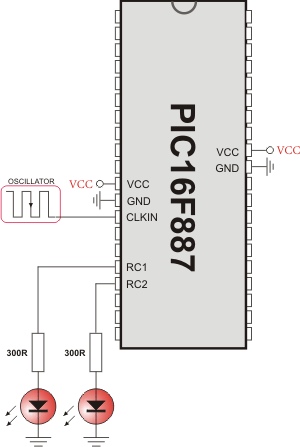
PWM demonstration
What do you think about this topic ? Send us feedback!
Find them on
